Video Asset Manager logo
Video Asset Manager vs Eddie AI - AI Video search tools.

Video Asset Manager vs Eddie AI

Both Video Asset Manager and Eddie AI use AI to work with your footage, but they're built for different jobs. Video Asset Manager analyzes and searches your entire b-roll library. Eddie AI is an assistant editor that creates rough cuts and logs clips one project at a time.
Key differences

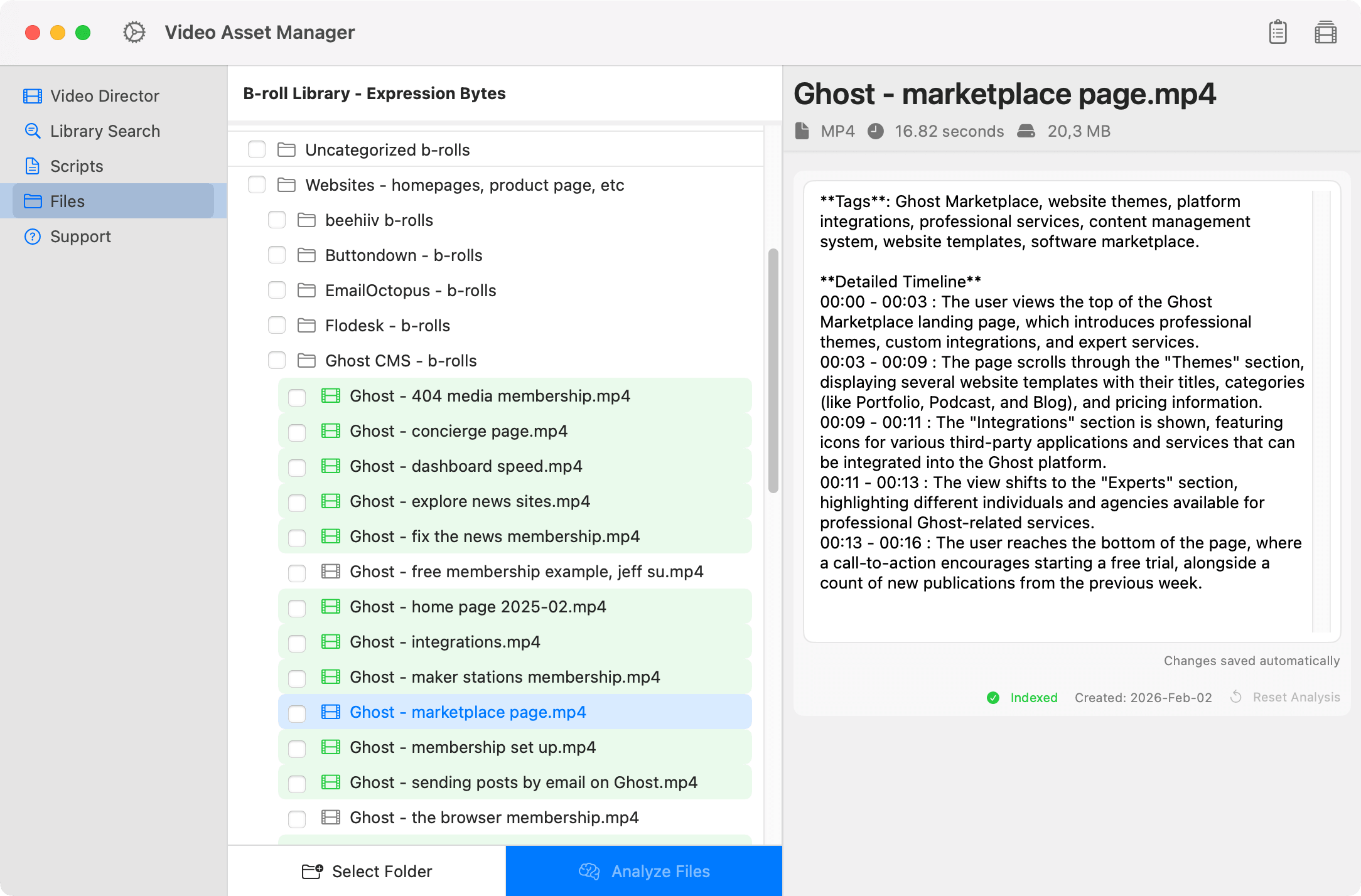
Video Asset Manager analyzes every video in your b-roll library and creates a detailed, timestamped breakdown of what's in it. It's not tags, it's an actual scene description you can read to understand the video.

"0:12–0:28: screen recording of a Google Analytics dashboard in dark mode showing the clicks per day" or "1:05–1:20: hands typing on a MacBook at a coffee shop".

When you need to find the b-roll suggestions, describe the b-roll you want. Video Asset Manager will show you the best b-roll options in seconds. And if you have the video's script, the app suggests the b-rolls based on the context. This improves b-roll placement by quite a lot.

Screenshot of Video Asset Manager showing the b-roll video name on the left and a detailed analysis panel on the right, including tags and a timestamped description of the clip's content.

Eddie AI is built for a different job. It's an assistant editor for dialogue-heavy content: rough cuts from interviews, multicam sync, logging clips per project. But it doesn't search your full archive, and its analysis is tuned for transcripts and dialogue, not visual scenes.

That distinction matters for YouTube workflows where half your b-roll is screen recordings, product shots, and location footage. Not talking heads.

Eddie extracts what people say. Video Asset Manager logs what you actually see in the frame, scene by scene, with timestamps.

Feature comparison

Video Asset Manager Eddie AI
Best for Solo creators and Video Editors Editors assembling rough cuts from dialogue-heavy footage
Core job Analyze Videos + Create the B-roll list AI-assisted editing, multicam sync, and footage logging
Video Analysis Yes (B-roll logging with incredible detail) Yes (dialogue transcription and clip logging per project)
B-roll Stock Footage No (Made for personal b-roll libraries) No
Data Processing Cloud AI for analysis + Results saved locally Cloud processing
NLE Integration No (on roadmap) Yes (Premiere, Resolve, FCP)
Pricing model $99 One-time + AI usage (Use your own keys) $15/credit or $167-$1,250/month

Pricing Comparison

Video Asset Manager is a one-time purchase. Analyzing videos costs roughly $0.20 to $0.50 per hour of video (tests made using Gemini 3 Flash). As for b-roll searches it costs fractions of a cent. To give you an idea a 50-hour b-roll library costs maybe $10 to $25 to analyze (one-time only).

Eddie AI has a pay-as-you-go tier where you buy credits for $15 each. Their paid plan start at $167/month and go all the way up to $1,250/month. That's $2,004 to $15,000 per year depending on the plan.

With Video Asset Manager, there's no subscription or credit system. You pay for what you use through your own API keys, and the bulk of that cost happens once during the initial analysis.

Why choose Video Asset Manager

Reduce manual work

Most editors have to log their b-roll by hand, scrubbing through every clip to see what's in it. Video Asset Manager does that for you! The app uses AI to analyze videos, and creates a timeline everything in the clip happening in the clip.

Screenshot of Video Asset Manager showing the b-roll video name on the left and a detailed analysis panel on the right, including tags and a timestamped description of the clip's content.
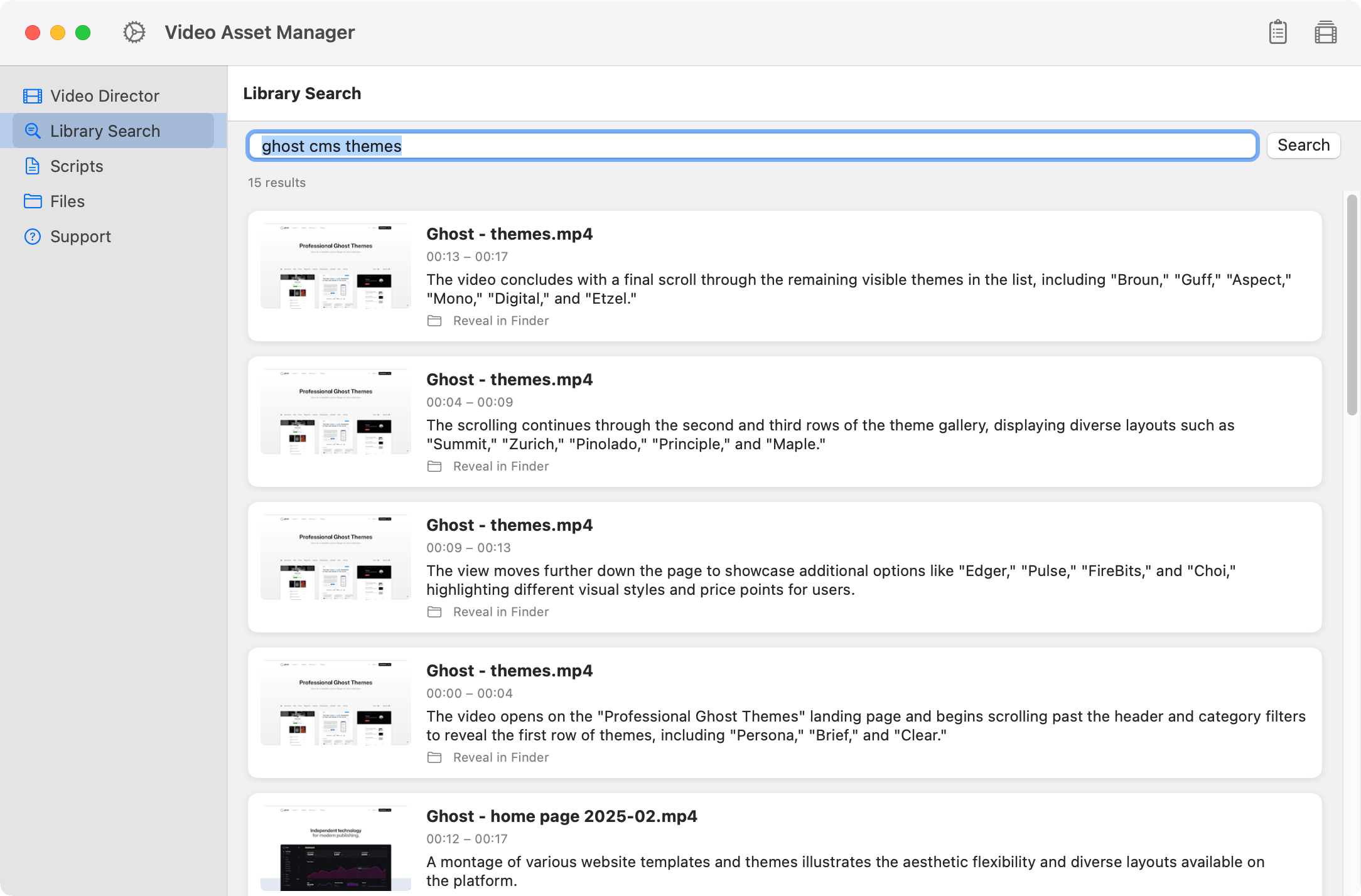
Screenshot of Video Asset Manager showing a search for b-roll clips, with results displaying video previews, names, timestamps, and short descriptions of each matching clip.
Find B-rolls faster

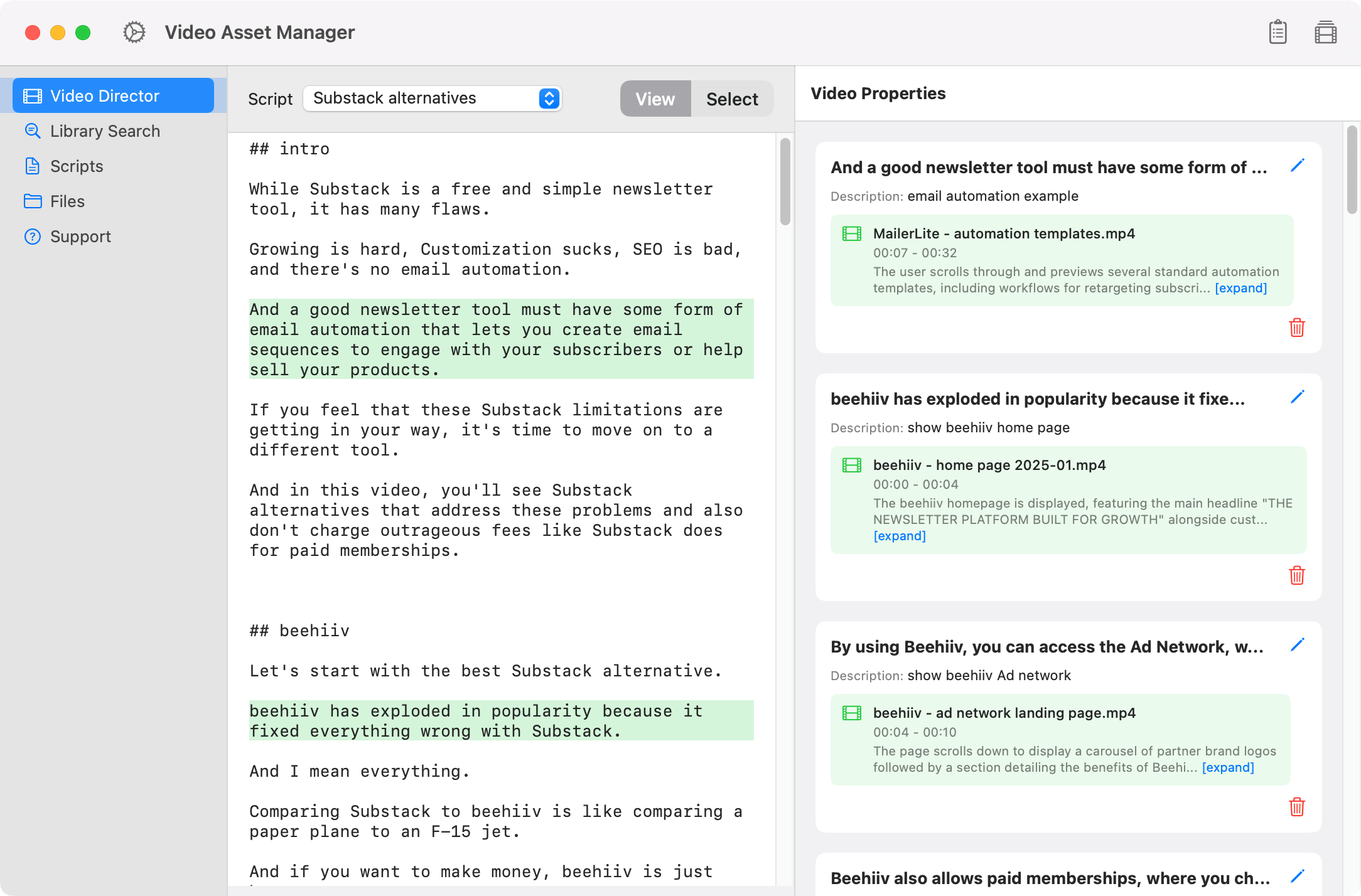
Instead of opening folders and scrubbing timelines, describe the b-roll you need and the let the app do the search. AI will look at your footage to find the best b-roll options. With the Video Director feature, you select a segment of your script, describe the b-roll you want, and get suggestions for that specific moment of the video.

No Subscriptions

Video Asset Manager is a one-time license purchase. There's no monthly costs, no annual renewal, and no tier upgrades. For the AI features, you bring your own API keys and only pay for what you actually use. This makes the Video Asset Manager one of the most affordable options on the market.

Screenshot of a Video Asset Manager showing a script about Substack alternatives, with highlighted text sections and a panel on the right listing b-roll clips used in the script with titles, descriptions, and timestamps.

Simple pricing

$99

Free

Free during beta!

  • AI-powered b-roll analysis
  • B-roll suggestions matched to your script
  • Semantic search: find footage by context, not filename
  • All future updates included

Be the first to try

Join the test users today

No credit card required.